index
All T-beam models (with the exception of the S3-Core) have an 18650 size battery holder on the rear of the device. This is designed to the original specification of the 18650 and only fits unprotected flat top 18650 cells. Button top and protected cells are typically longer than 65mm, often approaching 70mm.
Further information on the LILYGO® T-Beam devices can be found on LILYGO®'s GitHub page.
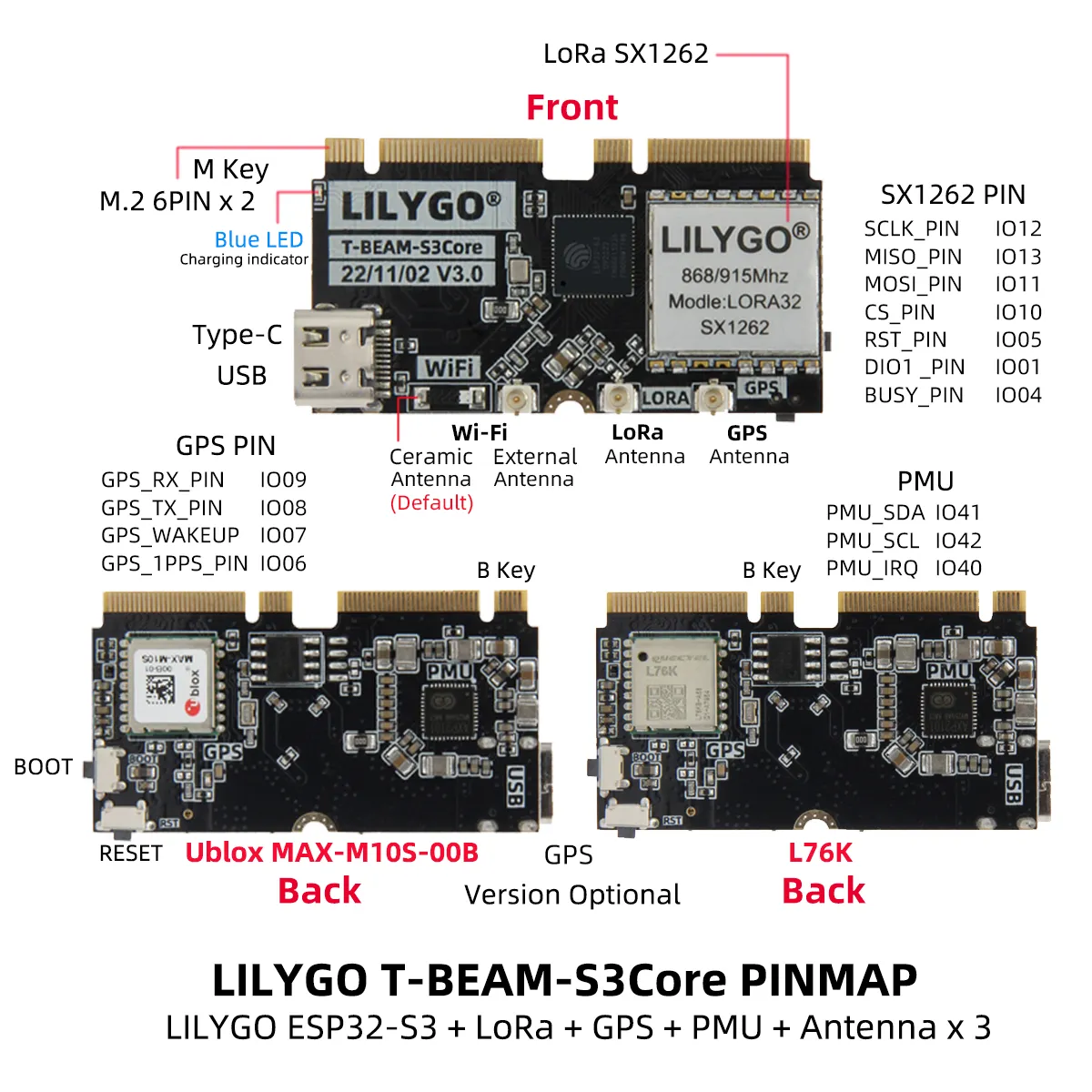
T-Beam S3 Core
- MCU
- ESP32-S3 (WiFi & Bluetooth 5LE)
- LoRa Transceiver
- Semtech SX1262 (improved performance)
- Frequency options
- 433 MHz
- 868 MHz
- 915 MHz
- Navigation Module
- NEO-M10S - GNSS receiver (supports GPS, GLONASS, Galileo, BeiDou) (better GPS sensitivity)
- Quectel L76K - (supports GPS, Beidou, GLONASS) (lower price)
- Connectors
- USB-C
- Antenna: U.FL antenna connector
Features
- SoftRF preinstalled (flashing to Meshtastic required)
- Boot and Reset switches
- Can be used standalone without 'Supreme' daughterboard in a headless configuration
Resources
- Firmware file:
firmware-tbeam-s3-core-X.X.X.xxxxxxx.bin - Purchase Links:
- International
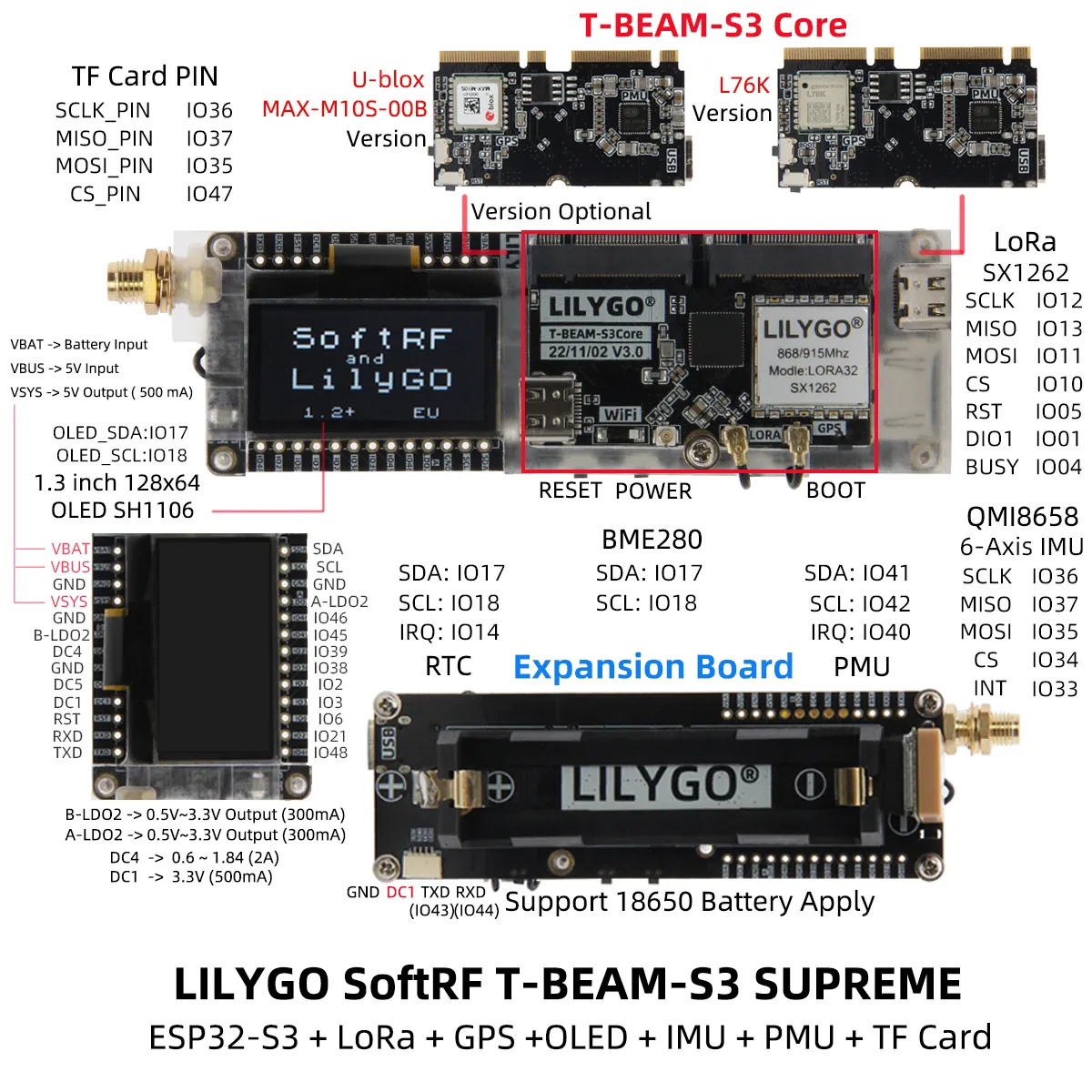
T-Beam Supreme
- MCU
- ESP32-S3 (WiFi & Bluetooth 5LE)
- LoRa Transceiver
- Semtech SX1262 (improved performance)
- Frequency options
- 433 MHz
- 868 MHz
- 915 MHz
- Navigation Module
- NEO-M10S - GNSS receiver (supports GPS, GLONASS, Galileo, BeiDou) (better GPS sensitivity)
- Quectel L76K - (supports GPS, Beidou, GLONASS) (lower price)
- Connectors
- USB-C
- Antenna: U.FL antenna connector
Features
- Includes T-Beam S3-Core Module
- SoftRF preinstalled (flashing to Meshtastic required)
- Power, Boot and Reset switches
- 1.3" OLED included
- BME280 Air pressure sensor
- QMI8658 IMU
- QMC6310 Magnetometer
- PCF8563 RTC
- Micro-SD reader (not implemented in Meshtastic)
Flashing
To flash ESP32-S3 devices like the T-Beam Supreme, you typically need to place them in Espressif's firmware download mode. Use the "1200bps reset" button in the web flasher to do this. If this method does not work for any reason, you can follow the manual process below.
:::warning
Do not proceed unless an antenna is connected to avoid possible damage to the device's radio.
:::
The following process will manually place the device into the Espressif Firmware Download mode:
- Unplug the device.
- Press and hold the BOOT button.
- Plug device in.
- After 2-3 seconds, release the BOOT button.
With the device now in the Espressif Firmware Download mode, you can proceed with flashing using one of the supported flashing methods. It's generally recommended to use the Web Flasher. You can select "Tbeam S3 Core from the device drop-down.
Resources
- Firmware file:
firmware-tbeam-s3-core-X.X.X.xxxxxxx.bin - Purchase Links:
- International
- US