zero-cost-hops-for-favorite-routers
What if messages could traverse your mesh infrastructure in a single hop?
What if you could bridge two cities 600 miles apart via LoRa and still have hops to spare?
What if a faster preset requires twice as many hops to reach your friends, but you don't have hops to spare?
That’s exactly what Zero-Cost Hops unlocks for your mesh.
{/ truncate /}
TL;DR
This feature improves message reach by preserving hops remaining between favorited routers.
Why does this matter?
- The faster presets like
SHORT_FASTandSHORT_TURBOtrade range for speed. In dense metro deployments that means you can burn through the 7-hops quickly. - Zero-Cost Hops turns a mesh of well-placed infrastructure routers into a single hop leaving more hops for the first and last mile.
- For well managed networks, this could allow for communication between cities, or even countries, while staying within the 7 hop limit.
- Helps prevent
CLIENT_BASEfrom becoming the last hop of a packet, so messages don’t die on the roof before reaching your indoor nodes.
When Do Zero-Cost Hops Apply?
A hop is preserved if all of these are true:
- Node role is
ROUTER,ROUTER_LATE, orCLIENT_BASE. - Not the very first hop of the packet.
- Previous relay is in your favorites and is
ROUTERorROUTER_LATE.
Miss any one of those and the hop meter ticks down as usual.
What It Doesn’t Touch
CLIENT_BASErebroadcast rules stay exactly the same.CLIENT_BASEusesfrom/to, while Zero-Cost Hops usesrelay_node.- Favoriting a router does not cause CLIENT_BASE nodes to rebroadcast all packets.
- Maximum Hop limit is still 7.
“Favorite” Detection and implementation
To keep the protobufs small and memory efficient, the node matches the relay_node against your favorites list and verifies the node is infrastructure.
With only 8 bits to work with in relay_node, there is a chance of collisions.
- The odds any one favorite collides with a random node is possible and increases as favorites increase.
- Colliders still need to be within range of the router to matter.
- Deduplication avoids loops.
- Accidental collisions are rare and harmless.
Probability of a collision in a sample environment:
| Total Nodes | Routers (3% of Total Nodes) |
Favorite Routers Within Range (20% of Routers) |
Collision Chance |
|---|---|---|---|
| 10 | 0.3 (≈1) | 1 | ~0.4 % |
| 50 | 1.5 (≈2) | 1 | ~0.4 % |
| 100 | 3 | 1 | ~0.4 % |
| 200 | 6 | 2 | ~0.8 % |
| 400 | 12 | 3 | ~1.2 % |
| 800 | 24 | 5 | ~2.0 % |
| 1000 | 30 | 6 | ~2.3 % |
Note: "Total Nodes" is the network size; collision probability is calculated based on the number of favorite routers within range, not all nodes divided by 256. For example, with 1000 total nodes and 6 favorite routers, the chance a random relay_node matches a favorite within range is about 2.3%.
Chances of a collision here is rare.
Two Quick Scenarios
1. Metro Simple Example Downtown
Setup
- Routers R1 and R2 use the
ROUTERrole and are favorited (to each other). - Sender uses the
CLIENTrole and wants to chat with a friend in the next town.
Path
CLIENT → R1 → R2 → CLIENT
Hop Route starting at 4 maximum hops
| Hop | Action | Counter | Hops Remaining |
|---|---|---|---|
| CLIENT → R1 | normal | –1 | 3 |
| R1 → R2 | zero-cost | 0 | 3 |
| R2 → CLIENT | normal | –1 | 2 |
Result: A hop is saved between R1 and R2 leaving an extra hop in case it is needed.
2. Home Base, Hill-Top Backbone
Setup
- Roof nodes use the
CLIENT_BASErole and have favorited the localROUTERnodes. - Each hilltop uses the
ROUTERrole and favorites each other. - All other nodes use the
CLIENTrole.
Hop Route starting at 7 maximum hops
| Hop | Path | Action | Counter Change | Hops Remaining |
|---|---|---|---|---|
| 1 | Handheld CLIENT → Roof CLIENT_BASE | normal | –1 | 6 |
| 2 | Roof CLIENT_BASE → Hilltop ROUTER | normal | –1 | 5 |
| 3 | Hilltop ROUTER → Midway ROUTER | zero-cost | 0 | 5 |
| 4 | Midway ROUTER → Remote ROUTER | zero-cost | 0 | 5 |
| 5 | Remote ROUTER → Remote CLIENT_BASE | zero-cost | 0 | 5 |
| 6 | Remote CLIENT_BASE → Outpost CLIENT | normal | –1 | 4 |
| 7 | Outpost CLIENT → Friend of Friend CLIENT | normal | –1 | 3 |
| 8 | Friend of Friend CLIENT → Friend CLIENT | normal | –1 | 2 |
This demonstrates the ability to go beyond the 7 hop protocol limit
How to Put It to Work
- Assign roles deliberately
ROUTERfor high mountaintop sites.ROUTER_LATEfor filling in the gaps.-
CLIENT_BASEat home; favorite your handhelds. -
Curate your favorites
Mutually favorite all the infrastructure router nodes and add them to yourCLIENT_BASEroof node as favorites. -
Test and trace
Run a traceroute before/after favoriting. Watch hops vanish.
:::tip
Design your mesh where all routers are favorited if bandwidth allows. It leaves as many hops as possible for scenic routing at the edge of the mesh.
:::
Safety Nets Still Apply
- Early/default/late timing is still in effect.
- Packet deduplication works as expected.
- Most impactful with nodes in high places, so abuse is unlikely with well managed networks.
FAQ
Can I raise the hop limit beyond seven?
Nope, it's still seven. You just get more mileage out of each hop.
Won’t this flood the mesh?
Not likely for well managed networks.
Do I need firmware changes?
Not for clients. Only ROUTER, ROUTER_LATE, and CLIENT_BASE nodes need to be upgraded to at least 2.7.11 to support this feature.
Does CLIENT_BASE count as infrastructure?
For incoming favorited traffic from routers, yes. This avoids messages dying on the roof before reaching your indoor nodes.
Does traceroute still work?
Zero-cost hops have no effect on traceroute other than traceroute itself is limited to 7 hops.
Real-world example
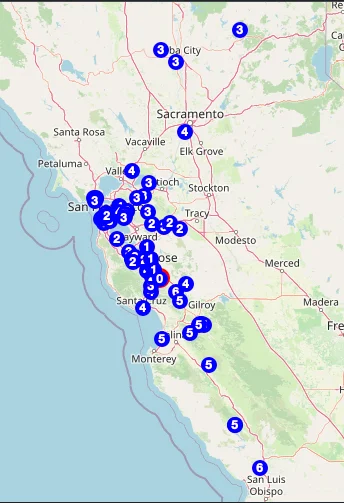
For Bay Mesh, there are over 700 nodes between Tahoe and San Luis Obispo. With careful placement of routers it is possible to have messages span over 300 miles that can only be accomplished on LoRa using zero-cost hops given the terrain and distance.
Using Meshview hosted by bayme.sh you can see the zero-cost hops in action between San Francisco, San Luis Obispo, and Tahoe.
Ready to Experiment?
Pick two or three strategic infrastructure nodes and favorite them to each other mutually.
Watch as hops are not consumed between the the routers.
Do the same for your roof CLIENT_BASE node and receive more messages than before.
Happy meshing. May your friends always be within range.