index
Vision Master E213
- MCU:
- ESP32-S3R8 (WiFi & Bluetooth)
- LoRa Transceiver:
- HT-RA62(Semtech SX1262)
- Frequency Options:
- 433 MHz
- 470 - 510 MHz
- 863 - 870 MHz
- 902 - 928 MHz
- Connectors:
- USB-C
- 2x1.25 lithium battery interface
- 2 x SH1.0-4P sensor interface
- Antenna:
- U.FL/IPEX antenna connector for LoRa
- Integrated 2.4 GHz PCB antenna, U.FL/IPEX antenna connector for 2.4 GHz.
Features
- Onboard 2.13-inch black and white E-Ink display screen
- Boot, Reset, and Custom(GPIO 21) switches
- No GPS
Flashing
To flash ESP32-S3 devices like the Vision Master E213, you typically need to place them in Espressif's firmware download mode. Use the "1200bps reset" button in the web flasher to do this. If this method does not work for any reason, you can follow the manual process below.
:::warning
Do not proceed unless an antenna is connected to avoid possible damage to the device's radio.
:::
The following process will manually place the device into the Espressif Firmware Download mode:
- Unplug the device.
- Press and hold the BOOT button.
- Plug the device in.
- After 2-3 seconds, release the BOOT button.
With the device now in the Espressif Firmware Download mode, you can proceed with flashing using one of the supported flashing methods. It's generally recommended to use the Web Flasher. You can select "Heltec Vision Master E213" from the device drop-down.
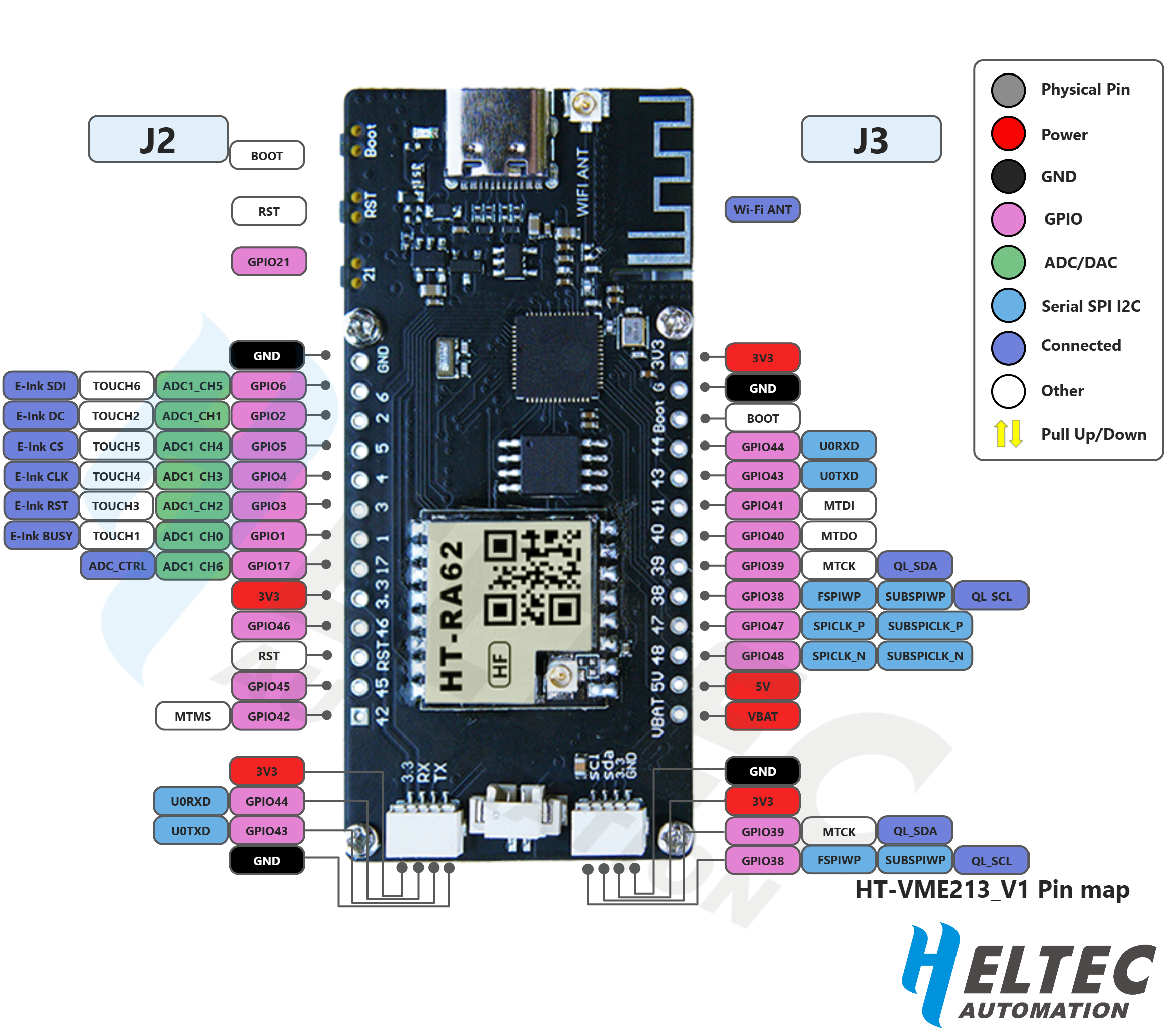
Pin Map
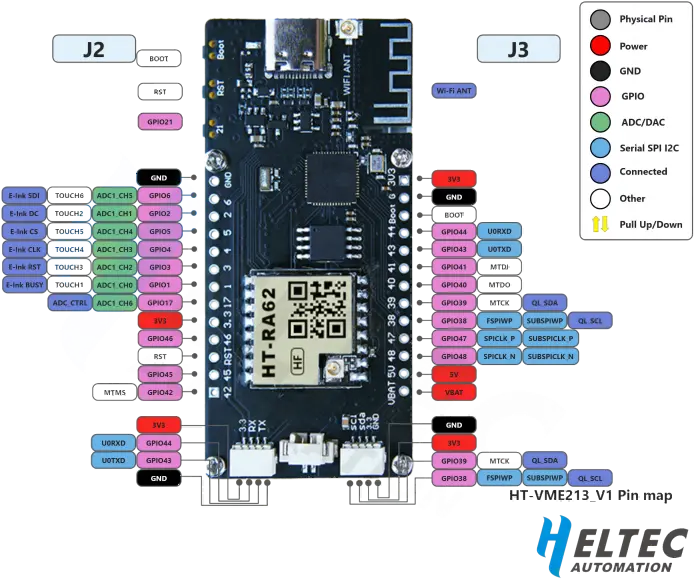
Image Source: Heltec
Resources
There is an additional interface on the board for 2.4GHz wireless signals. When connecting an external antenna, the resistor needs to be rotated 90 degrees to the left. For more details, please check the FAQ on Heltec's official website.
- Firmware file:
firmware-heltec-vision-master-e213-X.X.X.xxxxxxx.bin - Purchase Links:
- Heltec
- AliExpress
Vision Master E290
- MCU:
- ESP32-S3R8 (WiFi & Bluetooth)
- LoRa Transceiver:
- HT-RA62(Semtech SX1262)
- Frequency Options:
- 433 MHz
- 470 - 510 MHz
- 863 - 870 MHz
- 902 - 928 MHz
- Connectors:
- USB-C
- 2x1.25 lithium battery interface
- SH1.0-4P sensor interface
- Antenna:
- U.FL/IPEX antenna connector for LoRa
- Integrated 2.4 GHz PCB antenna, U.FL/IPEX antenna connector for 2.4 GHz.
Features
- Onboard 2.90-inch black and white E-Ink display screen
- Boot, Reset, and Custom(GPIO 21) switches
- Raspberry Pi GPIO famale header - 2x20
- No GPS
Flashing
To flash ESP32-S3 devices like the Vision Master E290, you typically need to place them in Espressif's firmware download mode. Use the "1200bps reset" button in the web flasher to do this. If this method does not work for any reason, you can follow the manual process below.
:::warning
Do not proceed unless an antenna is connected to avoid possible damage to the device's radio.
:::
The following process will manually place the device into the Espressif Firmware Download mode:
- Unplug the device.
- Press and hold the BOOT button.
- Plug the device in.
- After 2-3 seconds, release the BOOT button.
With the device now in the Espressif Firmware Download mode, you can proceed with flashing using one of the supported flashing methods. It's generally recommended to use the Web Flasher. You can select "Heltec Vision Master E290" from the device drop-down.
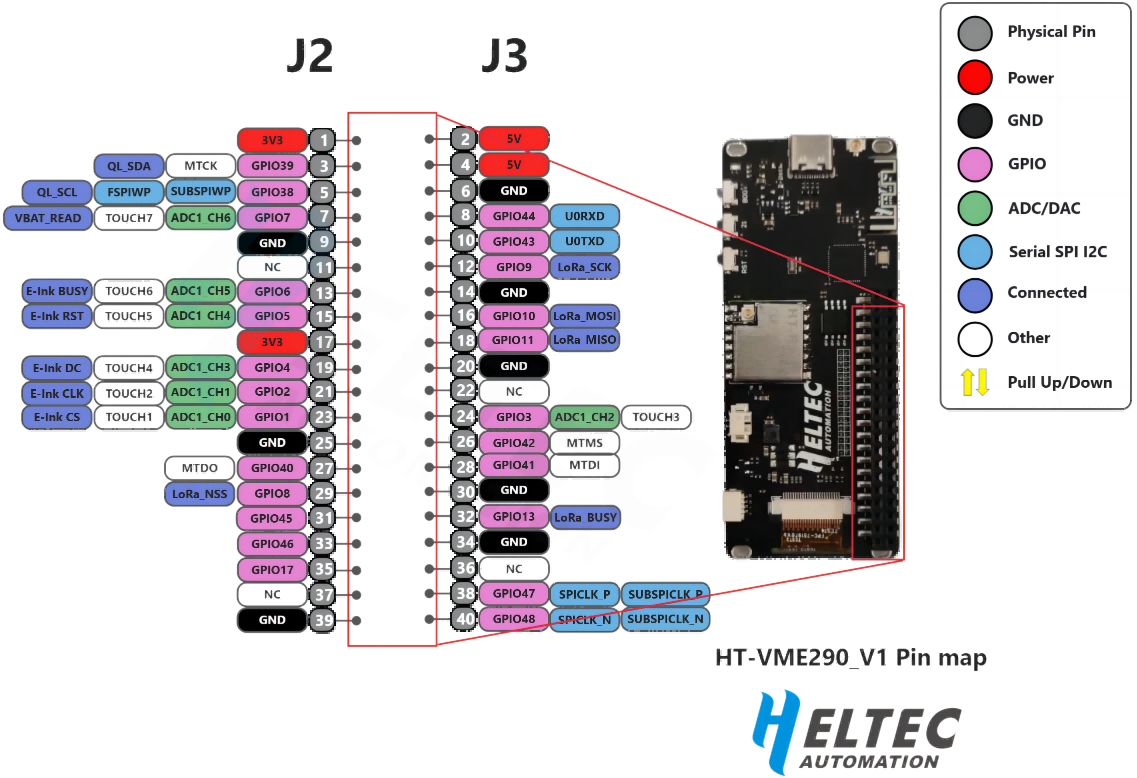
Pin Map
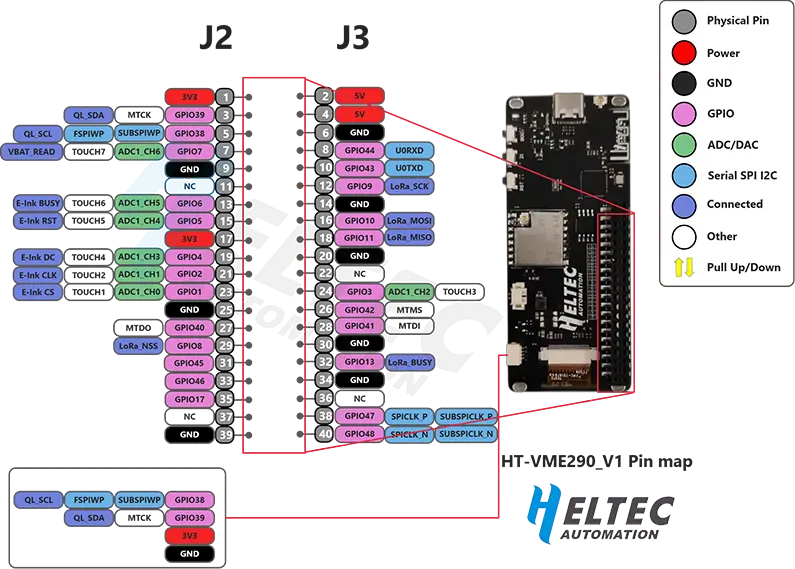
Image Source: Heltec
Resources
There is an additional interface on the board for 2.4GHz wireless signals. When connecting an external antenna, the resistor needs to be rotated 90 degrees to the left. For more details, please check the FAQ on Heltec's official website.
- Firmware file:
firmware-vision-master-e290-X.X.X.xxxxxxx.bin - Purchase Links:
- Heltec
- AliExpress
Vision Master T190
- MCU:
- ESP32-S3R8 (WiFi & Bluetooth)
- LoRa Transceiver:
- HT-RA62(Semtech SX1262)
- Frequency Options:
- 433 MHz
- 470 - 510 MHz
- 863 - 870 MHz
- 902 - 928 MHz
- Connectors:
- USB-C
- 2x1.25 lithium battery interface
- SH1.0-4P sensor interface
- Antenna:
- U.FL/IPEX antenna connector for LoRa
- Integrated 2.4 GHz PCB antenna, U.FL/IPEX antenna connector for 2.4 GHz.
Features
- Onboard 1.90-inch TFT-LCD color screen
- Boot, Reset, and USER switches
- No GPS
Flashing
To flash ESP32-S3 devices like the Vision Master T190, you typically need to place them in Espressif's firmware download mode. Use the "1200bps reset" button in the web flasher to do this. If this method does not work for any reason, you can follow the manual process below.
:::warning
Do not proceed unless an antenna is connected to avoid possible damage to the device's radio.
:::
The following process will manually place the device into the Espressif Firmware Download mode:
- Unplug the device.
- Press and hold the BOOT button.
- Plug the device in.
- After 2-3 seconds, release the BOOT button.
With the device now in the Espressif Firmware Download mode, you can proceed with flashing using one of the supported flashing methods. It's generally recommended to use the Web Flasher. You can select "Heltec Vision Master T190" from the device drop-down.
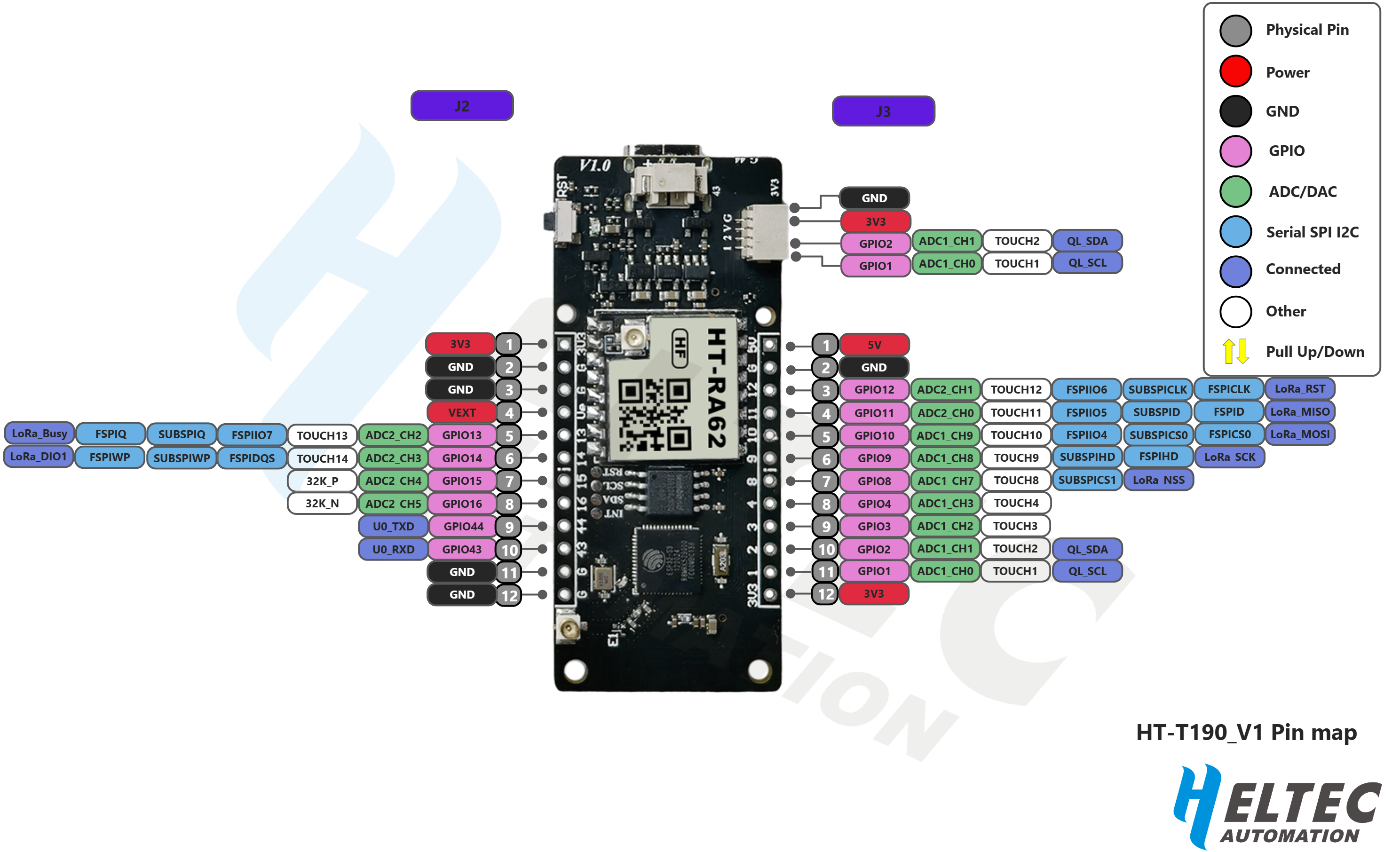
Pin Map
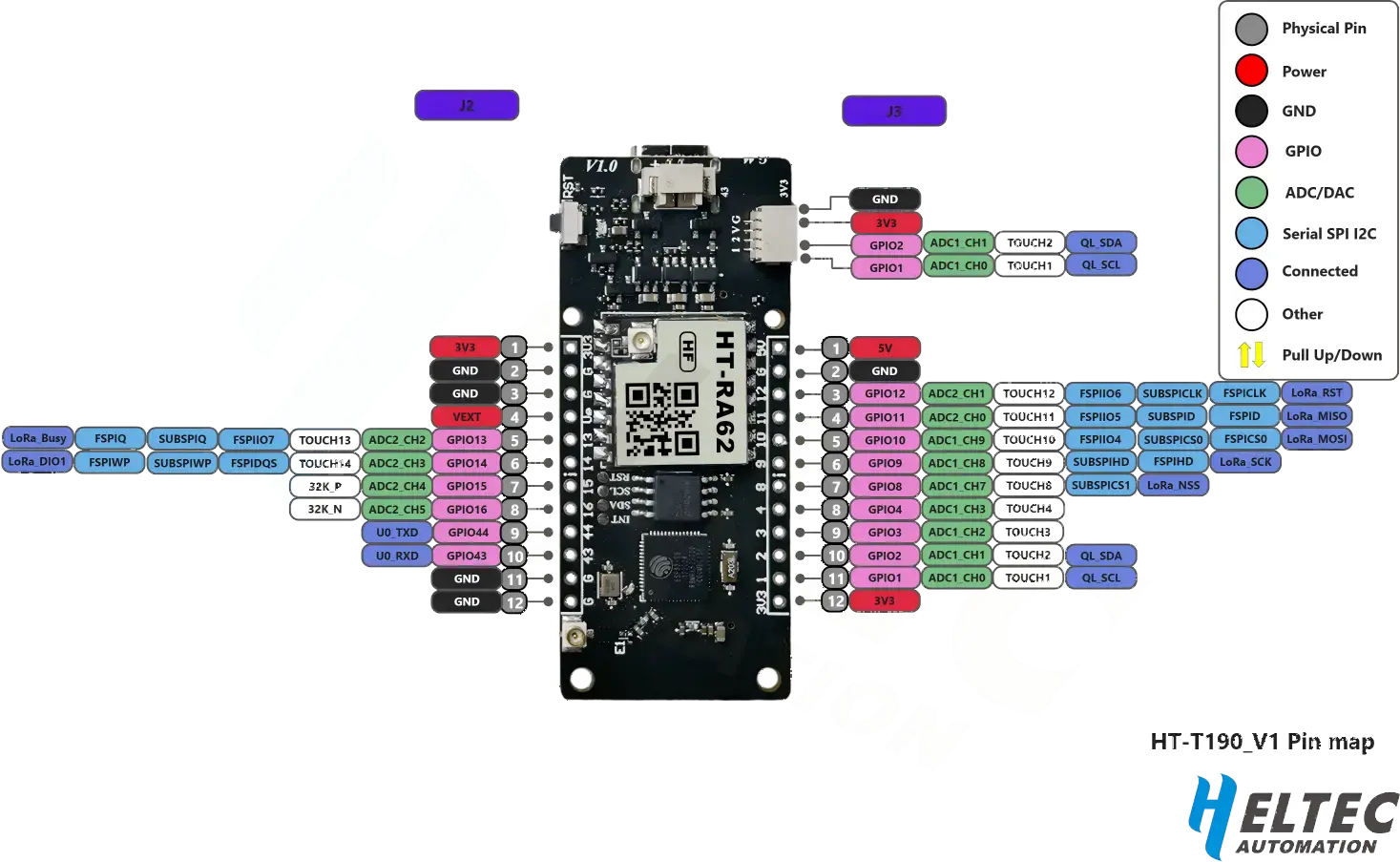
Image Source: Heltec
Resources
There is an additional interface on the board for 2.4GHz wireless signals. When connecting an external antenna, the resistor needs to be rotated 90 degrees to the left. For more details, please check the FAQ on Heltec's official website.
- Firmware file:
firmware-vision-master-t190-X.X.X.xxxxxxx.bin - Purchase Links:
- Heltec
- AliExpress