tips
Roles
It is strongly recommended to keep your ROLE set to CLIENT, CLIENT_MUTE, or CLIENT_BASE. Only use other roles if you have a specific, well-understood reason to do so. Read our blog post about choosing the best role.
Recommended Roles
CLIENTnodes receive, send, and intelligently repeat messages to help the mesh network.- This is the right choice for most situations.
- Automatically adds smart delays when rebroadcasting to keep the network stable.
- Perfect for nodes that can help others: rooftop installations, high-visibility locations, or nodes that extend network coverage.
-
Use when in remote areas (hiking, skiing, biking) where every node helps maintain connectivity.
-
CLIENT_MUTEnodes can send and receive messages but never repeat them. - Use with a personal handheld device when located near a more powerful node (such as a rooftop node) in a congested network.
- Use when multiple nodes are in close proximity. Set the best-positioned node to
CLIENTand the others toCLIENT_MUTE. -
Perfect for indoor nodes that only talk to one outdoor node - since they can't reach other nodes anyway, repeating messages would just waste bandwidth.
-
CLIENT_BASEnodes prioritize rebroadcasting messages from your other personal nodes. - Use for a stronger or well-positioned attic/roof “base station” node to distribute messages more widely from your own weaker, indoor, or less-well-positioned nodes.
- Set one node to
CLIENT_BASE. Set your other nodes (typicallyCLIENTorCLIENT_MUTE) as favorites on theCLIENT_BASE. - Perfect for ensuring all your nearby nodes take full advantage of your stronger, well-positioned attic/roof node.
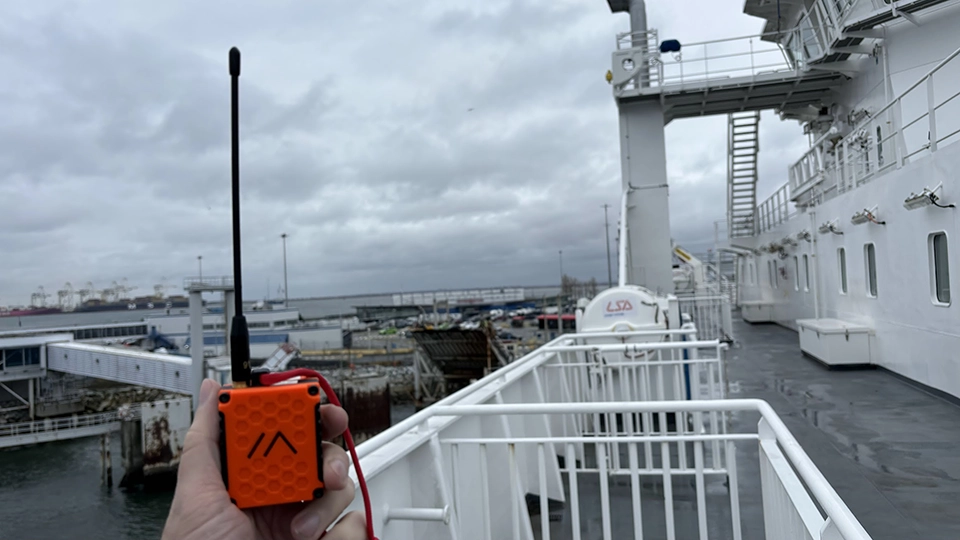 One example of a 'Client' node. Photo credit: Cully@KBOXLABS
Avoid ROUTERand REPEATER
Using ROUTER or REPEATER roles unnecessarily can cause serious network issues:
- Increased risk of packet collision.
- Reduced message delivery rates.
- Decreased effective network range due to unnecessary hop consumption.
These roles are for very specific applications. Before changing from CLIENT, carefully review the documentation to understand the implications. Additionally, coordinating this with your local community to ensure its impact is a positive one rather than a negative one.
Remember: A network of CLIENT nodes with a small number of well-placed ROUTERS is usually the most efficient and stable configuration.
 One example of a 'Router' node. Photo credit: Cully@KBOXLABS
(Not) Sharing Your Location
Telemetry is shared over your PRIMARY channel. This means that if your node has acquired GPS coordinates from an integrated GPS chip, or from your mobile device, your coordinates will be sent to the mesh over this channel, using its defined encryption (if any).
By default the PRIMARY channel's name is LongFast with the encryption key "AQ==" (Base64 equivalent of Hex 0x01). If this is left unchanged, your location will be shared with all nodes in range that are also using the default channel.
Using Position Precision
Meshtastic now supports the ability to control the precision of location data sent over a particular channel.
The position_precision setting allows control of the level of precision for location data that is sent over a particular channel. This can be useful for privacy reasons, where obfuscating the exact location may be desired when sending position data over certain channels.
For detailed information on position precision settings and how to configure them, please refer to the Position Precision documentation.
Sharing Location on a Private Secondary Channel
This is a newer feature that only works for firmware 2.7.1+
To share your location on a private secondary channel while keeping the default primary channel unencrypted, follow these steps:
- Disable location sharing on the primary channel (Channel 0) to prevent broadcasting your position to all users.
- Select a secondary channel where you want to share your location. Enable position sharing and choose your desired precision level.
- Understand automatic location updates:
- Only one channel receives your automatic, live location updates.
- This is the lowest-indexed secondary channel (excluding Channel 0) with location sharing enabled.
- If multiple secondary channels have location sharing enabled, only the one with the lowest index will receive automatic position broadcasts.
- Channels with location sharing enabled but not receiving automatic broadcasts can still be used for manual position requests.
Example Scenario
Imagine you’re in the following channels:
- Channel 0: “Everyone” (location OFF)
- Channel 1: “CampChat” (location ON)
- Channel 2: “Friends” (location ON)
- Channel 3: “TutuTuesdayGroup” (location OFF)
How It Works
- CampChat (Channel 1) receives your live, automatic location updates because it’s the lowest-indexed channel with location sharing enabled.
- Friends (Channel 2) can request your location manually, but it won’t receive automatic updates.
- TutuTuesdayGroup (Channel 3) allows chatting but does not share or receive location data.
Rebroadcast "Public" Traffic
Meshtastic nodes will rebroadcast all packets if they share LoRa modem settings, regardless of encryption (unless Rebroadcast mode is set to LOCAL_ONLY).
:::info
If you would like your nodes to include/expand the "public" mesh, you must use the default modem preset LONG_FAST. If you change your PRIMARY channel name, you must manually set the LoRa channel to the default for your region (see above).
:::
Hop Count
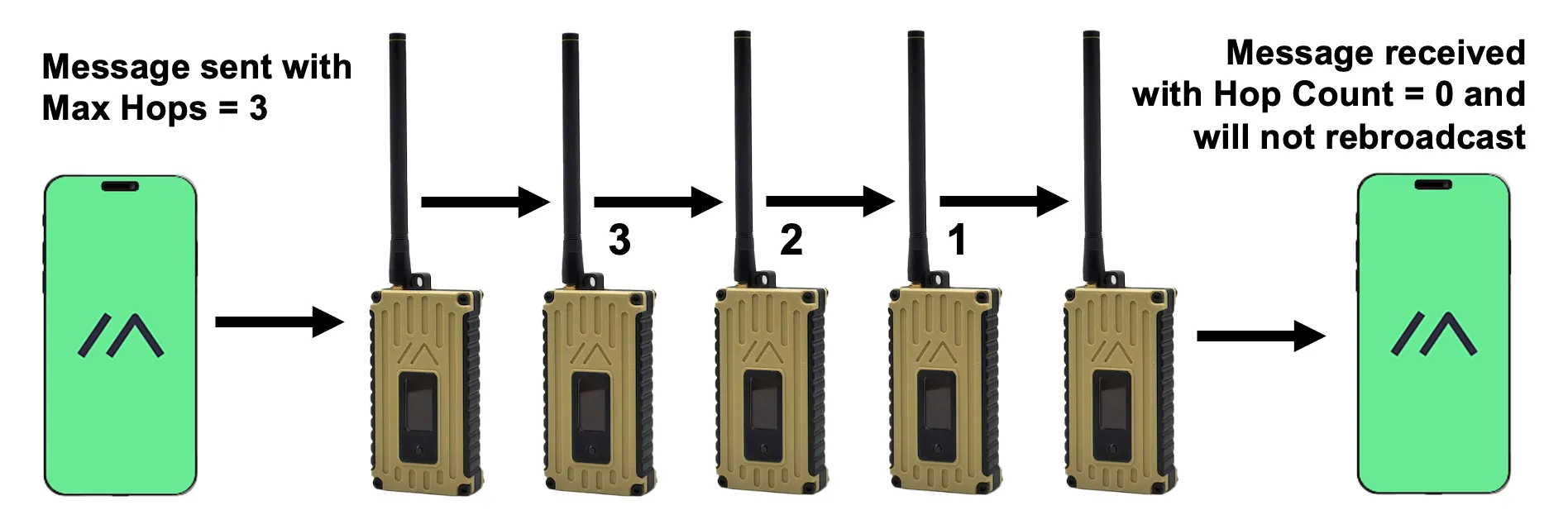
It is strongly recommended to leave your MAX HOPS set to 3 unless you're sure you need more (or less) to reach your destination node. Unnecessarily high hop counts often lead to network issues. If you need to increase the hop count, apply changes only to nodes at the network’s edges, not those near the middle.
Chat Channels and LoRa Frequency Slots
Previously, Meshtastic used the word "channels" to define two different configuration properties: Messaging Channels & LoRa Channel Numbers. However, this could lead to confusion since "channels" was being used to refer to two distinct concepts. To clarify the distinction, the decision was made to change "LoRa Channel Number" to "LoRa Frequency Slot".
Radio Config: Channels
These configure "message groups" and include your PRIMARY and SECONDARY channels. All SECONDARY channels use the same LoRa modem config as your PRIMARY channel (including LoRa frequency slot).
There are 8 total messaging channels. Channel 0 is your PRIMARY channel, with channels 1-7 available for private group messaging and/or special channels such as admin.
Radio Config: LoRa Frequency Slot
This property, formerly known as "LoRa Channel Number", configures the frequency the radio is set to. Check out the frequency calculator to view the relationship between "frequency slot" and radio frequency.
Best Practices
- If you are part of a large mesh and don't know what a setting does, don't change it (unless you're super curious).
- TEST your settings and hardware before you install in hard-to-reach locations.
- Connecting a node to the public MQTT server may publish the locations of all nodes in your mesh to the internet.