index
The T-Watch S3 is a compact wearable device featuring a 1.54-inch IPS LCD touch screen with a resolution of 240x240 pixels. It includes haptic feedback, an integrated microphone, speaker, real-time clock, and a three-axis accelerometer.
Specifications
- MCU
- ESP32-S3 (WiFi & Bluetooth 5 LE)
- LoRa Transceiver
- Semtech SX1262
- Frequency options
- 915 MHz
- 868 MHz
- 433 MHz
- Antenna
- U.FL/IPEX antenna connector for LoRa
- Connectors
- Micro-USB
Features
- 1.54 inch ST7789V TFT LCD (Resolution: 240 x 240)
- DRV2605 Haptic Driver
- I2S Speaker/Microphone & MAX98357 I2S Amp
- AXP2101 PMU and 400mAh battery.
- BMA423 Three Axis accelerometer
- Real-Time Clock
Flashing
To flash ESP32-S3 devices like the T-Watch, you typically need to place them in Espressif's firmware download mode. Use the "1200bps reset" button in the web flasher to do this. If this method does not work for any reason, you can follow the manual process below.
:::warning
Do not proceed unless an antenna is connected to avoid possible damage to the device's radio.
:::
The following process will manually place the device into the Espressif Firmware Download mode:
- Ensure the device is powered off by pressing and holding the crown button.
- Remove the device's back cover.
- Locate and press and hold the boot button.
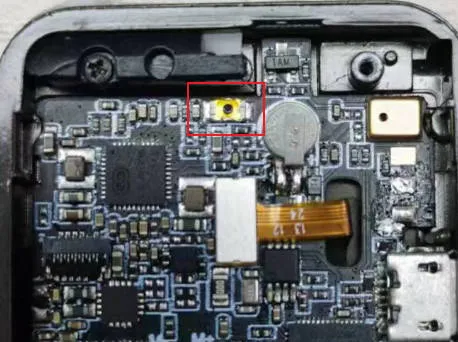
- While holding the boot button, press the crown button once to turn the device on.
- After 2-3 seconds, release the BOOT button.
With the device now in the Espressif Firmware Download mode, you can proceed with flashing using one of the supported flashing methods. It's generally recommended to use the Web Flasher. You can select "T Watch S3" from the device drop-down.
Resources
- Firmware file:
firmware-t-watch-X.X.X.xxxxxxx.bin
